
Qeda bills prepaid: there's a balance (My Credit Balance), and running services draw it down as they run rather than generating a bill afterward. Billing & Wallet is where that balance, its burn rate, and every top-up or charge live.
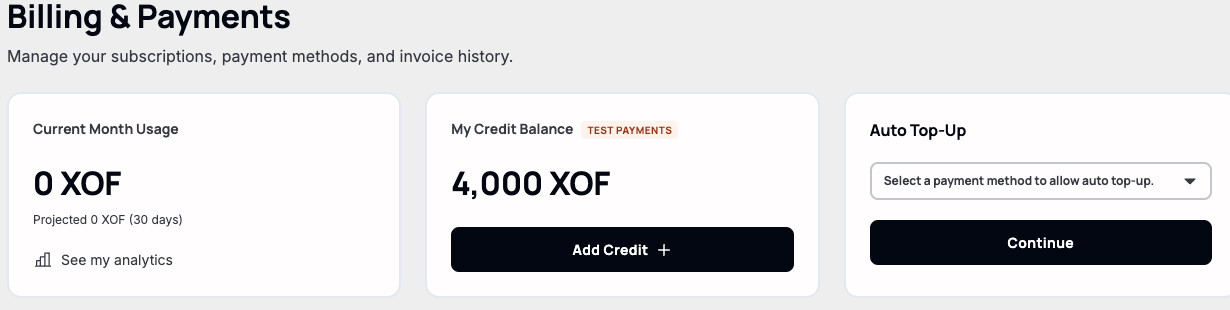
What you're paying for right now
The "Wallet" card breaks the burn down live: cost per hour, per day, a runway estimate (days left at the current rate), and the raw rates themselves (per vCPU-hour, per GB-hour, per companion-service-hour). A "Running projects" list shows exactly what's accruing cost — empty and it says so plainly, rather than showing a blank list with no explanation.
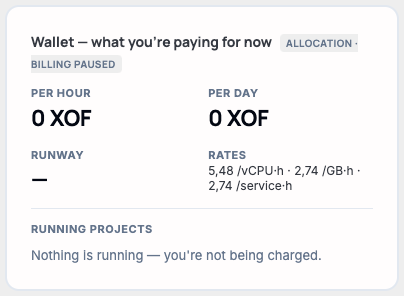
Note. Two billing modes exist — "allocation" (billed for capacity reserved, regardless of load) and "usage" (billed for what's actually measured running) — shown as the badge next to "Wallet." Which one applies depends on the account, not something toggled from this page.
The ledger
Every top-up and charge lands in "Wallet activity" — a running balance, not just a list of amounts. This account's only entry so far is its signup credit.

Note. Wallet activity isn't the same as Invoice History further down the page — top-ups and usage charges show up here immediately; invoices (covered in "Understanding your invoice history") are a separate, formal record.