qeda-logo

DocsDiscover your AI Hub

Using the AI Hub Playground

A chat interface for comparing up to five models side by side — currently simulated, with the product saying so itself.

The Playground opens on three preset packs — quick starting points that preselect a handful of models suited to a kind of task, rather than making you pick from scratch every time.
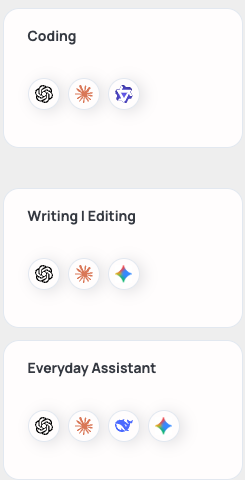
Three preset packs: Coding, Writing | Editing, and Everyday Assistant, each showing their included models' logos
Coding (GPT-5.5, Claude Opus 4.7, Qwen3 Coder), Writing | Editing (GPT-5.5, Claude Opus 4.7, Gemini 2.5 Pro), and Everyday Assistant (GPT-5.5, Claude Sonnet 4.6, DeepSeek V3, Gemini 2.5 Flash).

Picking models by hand

⌘+M (or the button next to "New Chat") opens the full list instead — up to five models at once, from any provider, mixed freely.
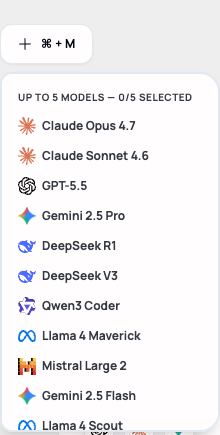
The model picker showing "UP TO 5 MODELS — 0/5 SELECTED" and a list including Claude, GPT, Gemini, DeepSeek, Qwen, Llama, and Mistral models
Every model here is available to compare — none are gated behind a separate plan.

Simulated responses

Sending a message answers once per selected model, side by side. Right now, every one of those answers is simulated — the Playground says so plainly in the response itself, not something this article is inferring.
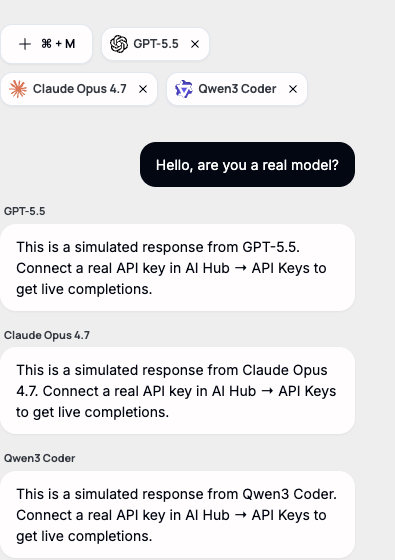
Three simulated responses, one per selected model, each stating "This is a simulated response... Connect a real API key in AI Hub → API Keys to get live completions."
This is the actual response text today, for any prompt, regardless of whether a real API key exists yet.

Note. A conversation still saves to the sidebar under "Recently" and can be reopened — that part works normally. It's specifically the model replies that are placeholders for now.